IdentityServer4 Events

I have been developing software with Microsoft technologies since .Net 2.0 and more recently have been developing .Net Core WebApi services with React front-ends. I became a Scrum Alliance certified scrum master in 2012 and since then have also become a certified scrum developer and certified scrum professional. As a technical lead my more recent contract roles have included the support of agile transformation or best practise adoption as well as application development.
I have written about using IdentityServer4 in previous posts, one of the requirements I have had in the past was to send security events, such as a successful login or failed login, to a separate security logging system. This post describes an implementation of an EventSink for processing security specific events, in this case they will be persisted to a database but you could use event stores like ELK or Splunk.
Event configuration
By default Events are turned off but can be configured globally in the ConfigureServices(...) method of the Startup class:
            var builder = services.AddIdentityServer(options =>
            {
                options.Events.RaiseErrorEvents = true;
                options.Events.RaiseInformationEvents = true;
                options.Events.RaiseFailureEvents = true;
                options.Events.RaiseSuccessEvents = true;
            })
There are examples of using the IEventSource service RaiseAsync method in the AccountController class. For example a UserLoginSuccessEvent is raised on a successful login otherwise a UserLoginFailureEvent can be raised:
        public async Task<IActionResult> Login(LoginInputModel model, string button)
        {
            if (ModelState.IsValid)
            {
                var result = await _signInManager.PasswordSignInAsync(model.Username, model.Password, model.RememberLogin, lockoutOnFailure: true);
                if (result.Succeeded)
                {
                    await _events.RaiseAsync(new UserLoginSuccessEvent(user.UserName, user.Id, user.UserName, clientId: context?.Client.ClientId));
                }
                else
                {
                    await _events.RaiseAsync(new UserLoginFailureEvent(model.Username, "invalid credentials", clientId:context?.Client.ClientId));
                }
            }
        }
Persisting the Events
To save the events to the database a SecurityEvent class is used and added to the ApplicationDbContext class as a DbSet:
public DbSet<SecurityEvent> SecurityEvents { get; set; }
The SecurityEvent class accepts an Event through its constructor, this event contains structured data and includes event IDs, success/failure information, categories and other details.
    public class SecurityEvent
    {
        public SecurityEvent() { }
        public SecurityEvent(Event evt)
        {
            EventDate = DateTime.Now;

            if (evt is UserLoginSuccessEvent loginSuccessEvent)
            {
                Event = nameof(UserLoginSuccessEvent);
                Data = JsonSerializer.Serialize(loginSuccessEvent);
            }
            else if (evt is UserLoginFailureEvent loginFailureEvent)
            {
                Event = nameof(UserLoginFailureEvent);
                Data = JsonSerializer.Serialize(loginFailureEvent);
            }
            else if (evt is UserLogoutSuccessEvent logoutSuccessEvent)
            {
                Event = nameof(UserLogoutSuccessEvent);
                Data = JsonSerializer.Serialize(logoutSuccessEvent);
            }
        }

        public int Id { get; set; }
        public string Event { get; set; }
        public DateTime EventDate { get; set; }
        public string Data { get; set; }
    }
The default event sink will serialize the event to JSON and forward it to the logging system. To store the event to the database an implementation of the IEventSink interface is register in the DI container. In this case the SecurityEventSink constructor accepts the ApplicationDbContext and the SecurityEvent is saved to the database. Other storage services could be injected in this way:
    public class SecurityEventSink : IEventSink
    {
        private readonly ApplicationDbContext _dbContext;
        public SecurityEventSink(ApplicationDbContext dbContext)
        {
            _dbContext = dbContext;
        }

        public async Task PersistAsync(Event evt)
        {
            SecurityEvent securityEvent = new SecurityEvent(evt);

            if (!string.IsNullOrEmpty(securityEvent.Event))
            {
                _dbContext.Add(securityEvent);
                await _dbContext.SaveChangesAsync();
            }
        }
    }
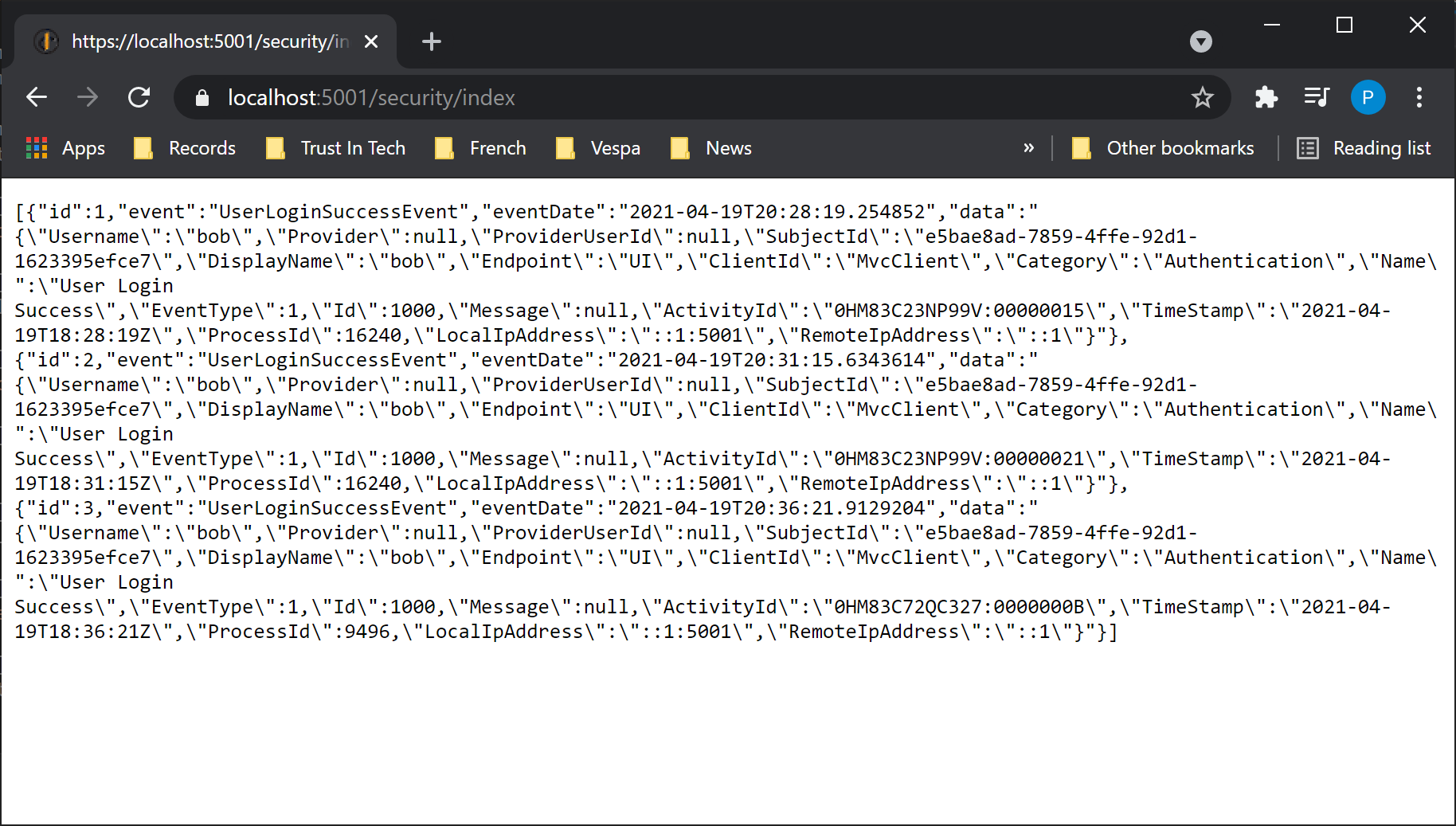
To see the security events saved to the database a SecurityController class has been added that provides a WebAPI endpoint that lists the database entries in JSON format:
 I hope you find this post useful, the source code can be found here in github